Assessment mode
Practice coding interviews like a real online assessment
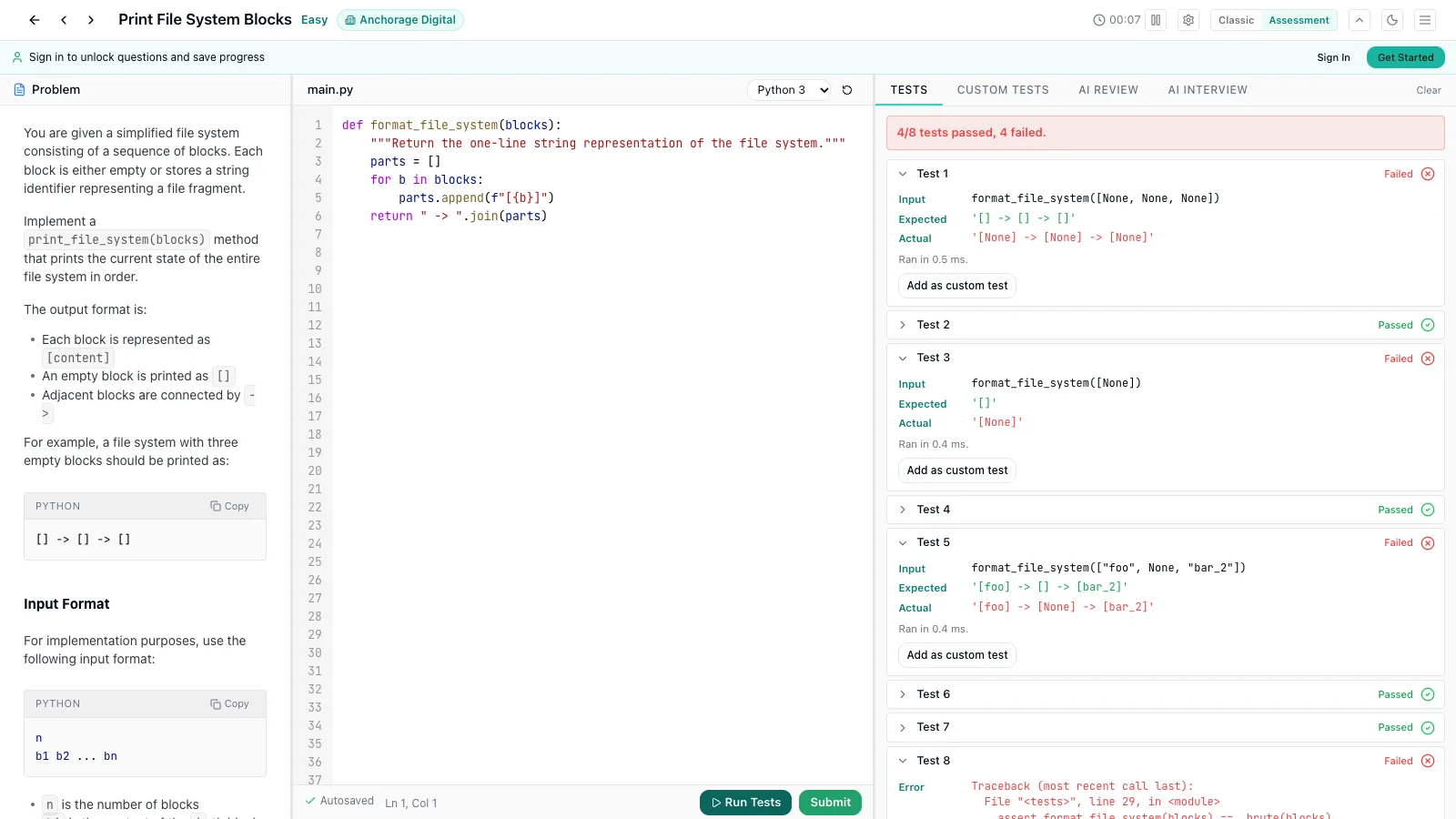
Problem, editor and tests side by side, a running clock, and real test runs that show expected against actual output. Start with 206 free coding questions, one from each of 206 companies — no account needed.
What you get
The same questions and tests as the classic question page, arranged the way a coding test is.
Three panels, one screen
The problem on the left, your code in the middle, tests and results on the right — the layout most online assessments use. Drag the dividers to resize; on a phone the panels become tabs.
A timer you control
An elapsed-time clock runs from the moment you open the question. Pause it, or hide it in settings if you would rather not watch it.
Real test runs
Run your code against the question’s tests. Each case shows its input, the expected value and what your code returned, plus anything you printed. Submit runs the full set and records the result in your browser.
Custom tests
Add your own cases with structured inputs and an expected output, LeetCode-style, or turn a failing case into a custom test with one click.
AI Review and AI Interview
On plans that include AI, the right panel also holds AI Review — feedback on correctness, complexity and code quality without the full solution — and the AI interviewer.
Switch back any time
Assessment mode is opt-in. One toggle in the question header switches between it and the classic view, and your choice is remembered in this browser. Your code is saved as you type.
Who it is for
Online assessments (OAs)
Many companies send a timed coding test before the first interview: a fixed number of problems, a browser IDE, hidden tests. Practicing in the same layout means the format is not a surprise on the day.
Take-home and proctored screens
Platform-hosted screens score you on tests passing, not on a conversation. Getting used to reading a failing case — expected against actual — and fixing it quickly is the skill being measured.
Interview loops at a specific company
Every question in the bank was reported from a real interview at a named company, so you can rehearse on the problems that company has actually asked.
How to use it
- 1
Pick a question
Choose any free question below, or any question you have unlocked. Each “Start assessment” link opens it straight in Assessment mode.
- 2
Solve against the clock
Read the problem on the left, write Python in the editor, and press Run tests (Ctrl/Cmd + Enter) as often as you like. Add custom tests for the edge cases you are unsure of.
- 3
Submit and review
Submit runs every test and shows which passed. If something failed, compare expected with actual, fix it and submit again — then read the editorial on the classic view.
Already on a question? Press Assessment view in its header to switch.
Free coding questions to practice on
Every question here is fully open: the problem, the editor and the tests, with no account. Most come with automated tests; where a question has none, write your own as custom tests. Each was reported from a real interview at the company shown.
Easy (44)
- Print File System BlocksStart assessment
Anchorage DigitalEasy
- Start assessment
- Remove all occurrences of a target value from a linked listStart assessment
Arista NetworksEasy
- Start assessment
- Find different elements in two listsStart assessment
Bank of AmericaEasy
- Arithmetic or Geometric Sequence DetectionStart assessment
BeaconfireEasy
- Common Elements in Two ListsStart assessment
BlackRockEasy
- Docker Environment Cleanup TaskStart assessment
BlizzardEasy
- Minesweeper Board GenerationStart assessment
BlockEasy
- Start assessment
- Valid ParenthesesStart assessment
C3.aiEasy
- Add Two Reversed Digit ListsStart assessment
CiscoEasy
- Start assessment
- Filter SIM Records by AttributesStart assessment
CommureEasy
- Start assessment
- Integer AND OperationStart assessment
DRWEasy
- Construct New ArrayStart assessment
DuolingoEasy
- Easy Encryption and DecryptionStart assessment
General MotorsEasy
- Start assessment
- Find Numbers with Two Sevens Divisible by ThreeStart assessment
HackerRankEasy
- Implement a Queue with O(1) Mean QueryStart assessment
Headlands TechnologiesEasy
- Implement a 3x3 Tic-Tac-Toe ClassStart assessment
HebbiaEasy
- Slot Machine SimulationStart assessment
HopperEasy
- Find ID of SoldierStart assessment
HSBCEasy
- Calculate TaxStart assessment
Interactive BrokersEasy
- Compare Source and Destination Files and Return If ChangedStart assessment
Jump TradingEasy
- Reverse a 32-bit IntegerStart assessment
KeysightEasy
- Daily Remaining GPUs per ClusterStart assessment
Mistral AIEasy
- Start assessment
- No Pairs Allowed (Minimum Substitutions)Start assessment
PalantirEasy
- Start assessment
- Fire Event ProblemStart assessment
Pure StorageEasy
- ASCII PrinterStart assessment
QuoraEasy
- Implement an In-Memory Key-Value StoreStart assessment
RBC Royal BankEasy
- Start assessment
- Merge Two Sorted VectorsStart assessment
SquarepointEasy
- Merge Two Sorted ListsStart assessment
SquarespaceEasy
- Rearranged String Check (Anagram)Start assessment
StacklineEasy
- Card Counting GameStart assessment
TalrooEasy
- Start assessment
- Start assessment
- Rotate ArrayStart assessment
Warner Bros. DiscoveryEasy
- Linked List Removal ConditionStart assessment
Warner Music GroupEasy
- Triplets With Unique CharsStart assessment
ZipRecruiterEasy
Medium (141)
- Start assessment
- Probability of Rolling a 1 FirstStart assessment
AgodaMedium
- Menu — Minimum Cost to Cover Wanted ItemsStart assessment
AirbnbMedium
- Excel Redo and Undo SimulationStart assessment
AirtableMedium
- Minimum Days to Release UpdatesStart assessment
Akuna CapitalMedium
- Count Perfect Stamp PackagingsStart assessment
AmazonMedium
- Validate Employees in a Hierarchy with Recursive RulesStart assessment
AmplitudeMedium
- Convert Stack Samples to Trace EventsStart assessment
AnthropicMedium
- Merge 2D Line SegmentsStart assessment
Applied IntuitionMedium
- Start assessment
- ASCII PrinterStart assessment
AsanaMedium
- Agent Rating Average RankingStart assessment
AtlassianMedium
- Start assessment
- Detect Abusive Books from a Stream of Read EventsStart assessment
AudibleMedium
- Postfix Expression CalculatorStart assessment
AuroraMedium
- Thread-Safe Queue (Mutex + Condition Variable)Start assessment
Belvedere TradingMedium
- Finest Food Outlet (API pagination + filtering + tie-breaking)Start assessment
Blink HealthMedium
- Piles Of BoxesStart assessment
BNP ParibasMedium
- Digit SumStart assessment
BNY MellonMedium
- Retention Policy CollisionStart assessment
BoxMedium
- Start assessment
- Count Land Regions in a GridStart assessment
BridgewaterMedium
- Task Execution Order on One ProcessorStart assessment
ByteDanceMedium
- Element SwappingStart assessment
CanvaMedium
- Next Word Prediction Algorithm Using N-gram ModelStart assessment
Cash AppMedium
- Start assessment
- Smart Queue / Stock Quote ContainerStart assessment
Chicago Trading CompanyMedium
- Simulate a Board GameStart assessment
ChimeMedium
- Alert Execution Engine with Threshold Checks and Repeat NotificationsStart assessment
ChronosphereMedium
- Task Query by Time and Name Filter with SortingStart assessment
CircleMedium
- Wildcard / Regex String Matching (star operator)Start assessment
CitadelMedium
- Implement Minesweeper GameStart assessment
ClayMedium
- Start assessment
- K-th Largest Stock Price in Continuous StreamStart assessment
CME GroupMedium
- AI Enhanced Pilot - Domain (AI-Assisted Coding Round)Start assessment
CoinbaseMedium
- Count Good StringsStart assessment
CommvaultMedium
- Text Search: search a word, then search a phrase (follow-up)Start assessment
ConfluentMedium
- Start assessment
- Start assessment
- Team Voting: Popular Vote and Ranked-Choice WinnerStart assessment
CourseraMedium
- Shuffle a Deck of 52 CardsStart assessment
CrowdStrikeMedium
- Police StationStart assessment
D. E. ShawMedium
- Order Processing SystemStart assessment
Da Vinci TradingMedium
- Delete Element at Flattened Index From Sorted IntervalsStart assessment
DatabricksMedium
- Implement Buffer File Write ClassStart assessment
DatadogMedium
- Recipe Shopping Cart (Ingredients Still Needed)Start assessment
DecagonMedium
- Count Divisible PermutationsStart assessment
DeloitteMedium
- Counting TripletsStart assessment
DemonwareMedium
- Longest Non-negative Transaction SubsequenceStart assessment
DocuSignMedium
- Code Craft: Restaurant Delivery HeatmapStart assessment
DoorDashMedium
- Simulate a File System with Access ControlStart assessment
DropboxMedium
- Course Schedule (Topological Sort)Start assessment
eBayMedium
- Koko Eating BananasStart assessment
Eightfold AIMedium
- Number of ProvincesStart assessment
ExpediaMedium
- Photo AlbumStart assessment
FactSetMedium
- Start assessment
- Calculate Rolling Volatility for Large DatasetsStart assessment
FidelityMedium
- Throw The BallStart assessment
FlexportMedium
- Checksum AggregatorStart assessment
FortinetMedium
- Workflow Service: Create and Execute Dependent StepsStart assessment
FurtherAIMedium
- Total Distance to the Nearest Store in a GridStart assessment
GE HealthcareMedium
- Start assessment
- Maximum-Sum Simple Path in a Small GridStart assessment
Goldman SachsMedium
- Tile-Stack Merge GameStart assessment
GoogleMedium
- Time-Based Key-Value StoreStart assessment
GustoMedium
- In-Memory File SystemStart assessment
HarveyMedium
- Hierarchical Endpoint and Global Rate LimiterStart assessment
HeadwayMedium
- Start assessment
- Maximum Concurrent Calls from Time IntervalsStart assessment
HubSpotMedium
- Start assessment
- Chain of Command — Longest Chain LengthStart assessment
IMC TradingMedium
- Number of Unique Elements After ModificationsStart assessment
InfosysMedium
- Pandas Meeting Work-Duration CalculationStart assessment
IntuitMedium
- Growth in 2 DimensionsStart assessment
IXLMedium
- Transform StringStart assessment
Jane StreetMedium
- Can All Courses Be Completed?Start assessment
JPMorganMedium
- Start assessment
- Start assessment
- Stock Tick Store with Updates and Percentage ChangesStart assessment
Lead BankMedium
- Eddington DistanceStart assessment
LiftoffMedium
- Versioned Nested Key-Value StoreStart assessment
Luma AIMedium
- Grid Infection Spread TimeStart assessment
LyftMedium
- Meeting Rooms (No Overlap)Start assessment
Maven ClinicMedium
- Subarray Maximum Element LengthStart assessment
MolocoMedium
- Find Maximum Number of StringsStart assessment
MoveworksMedium
- Set Matrix ZeroesStart assessment
NavanMedium
- Top K Frequent IP AddressesStart assessment
NewsBreakMedium
- Start assessment
- Nested Todo ListStart assessment
NotionMedium
- No Adjacent CharactersStart assessment
NutanixMedium
- Palindromic StringsStart assessment
NVIDIAMedium
- Count Unique Paths in a GridStart assessment
OktaMedium
- Giving Tree of Errors: Validate Parent-Child Pairs and Output Lexicographically Smallest S-ExpressionStart assessment
OptiverMedium
- Hospital Appointment Booking APIStart assessment
OracleMedium
- Decode Morse Code to All Possible Original StringsStart assessment
Oscar HealthMedium
- Minimum Water Tanks to Cover HousesStart assessment
Palo Alto NetworksMedium
- Minimize Computation TimeStart assessment
PatreonMedium
- Similar Password (Singapore)Start assessment
PayPalMedium
- Palindromic Array TransformationStart assessment
PayPayMedium
- Longest Substring With One Character Allowed to Repeat OnceStart assessment
PinduoduoMedium
- Robot Vacuum 8-Direction GridStart assessment
PinterestMedium
- Per-User Sliding Window Rate LimiterStart assessment
PlaidMedium
- Start assessment
- Start assessment
- Start assessment
- Food Delivery Platform ManagementStart assessment
RippleMedium
- Maximize Currency After Two Days of ConversionsStart assessment
RipplingMedium
- Start assessment
- Horizontal Pod AutoscalerStart assessment
RubrikMedium
- Start assessment
- Merge Streams in OrderStart assessment
SierraMedium
- Create a Pivot TableStart assessment
Sigma ComputingMedium
- Binomial Tree Risk Neutral PricingStart assessment
SMBCMedium
- Rock-Paper-Scissors LineupStart assessment
SoFiMedium
- Find the Second Largest and Kth Largest NumberStart assessment
SpotifyMedium
- SongShuffler with CooldownStart assessment
StackAdaptMedium
- REST API Integration and AggregationStart assessment
StripeMedium
- First Solar Panel Placement in a Binary GridStart assessment
TeslaMedium
- Shopping Cart SimulatorStart assessment
The Trade DeskMedium
- Count GroupsStart assessment
TwilioMedium
- Start assessment
- Start assessment
- Start assessment
- Start assessment
- Start assessment
- Start assessment
- Compute Overlapping Intervals Across Multiple Schedules (Line Sweep)Start assessment
Veeva SystemsMedium
- Find Common Available Time SlotsStart assessment
VerkadaMedium
- Find Strictly Decreasing 8-Hour Weather Periods for Equatorial CitiesStart assessment
Verse MedicalMedium
- Minimum Bit Flips to Make All Numbers EqualStart assessment
Virtu FinancialMedium
- Smash The Bricks(NG)Start assessment
WayfairMedium
- Multi-threaded Increment with Thread SafetyStart assessment
WeRideMedium
- Shopping and BillingStart assessment
WeWorkMedium
- User Journey Paths (Action Log Trie Summary)Start assessment
WhatnotMedium
- Start assessment
- The Huffman DecoderStart assessment
Wolverine TradingMedium
- Start assessment
- Start assessment
- Next Notification Date CalculationStart assessment
ZillowMedium
- Start assessment
- Start assessment
Hard (21)
- Start assessment
- Start assessment
- Start assessment
- Eric's SequenceStart assessment
CodeiumHard
- Start assessment
- Generate Lexicographically Smallest StringStart assessment
Deutsche BankHard
- Minimum Operations to Make Arrays EqualStart assessment
MathWorksHard
- Start assessment
- Minimum XOR Sum Over PermutationsStart assessment
MongoDBHard
- Fixed-Width Text DisplayStart assessment
Otter.aiHard
- Start assessment
- Rolling Median / Sliding Window MedianStart assessment
Radix TradingHard
- Reach The PointStart assessment
SamsungHard
- Maximum Sum of Balanced SubsequenceStart assessment
ServiceNowHard
- Start assessment
- Start assessment
- Start assessment
- Kac Ring Dynamic System SimulationStart assessment
VoleonHard
- Find Maximum DistanceStart assessment
Wells FargoHard
- Start assessment
- Design a Max Stack (Optimal)Start assessment
ZiplineHard
Want more? The full bank opens in Assessment mode too, once a question is unlocked — see pricing.
Questions
What is Assessment mode?
A second interface for the question page, built like a coding-test IDE: the problem, the code editor and the test results sit side by side in three resizable panels, with an elapsed timer in the header. It runs the same tests as the classic view; only the layout and the workflow change.
Is it free?
Yes for the free questions listed on this page — anyone can open them, run the tests and submit, without an account. Every other question opens in Assessment mode once it is unlocked by a subscription. AI Review and the AI interviewer need a plan that includes AI.
Which languages can I use?
Tests run in Python 3, in your browser. The editor also lets you write JavaScript, Java or C++, but those are for writing only: running tests and custom tests needs Python.
Is the timer a countdown?
No. It counts up from when you open the question, so you can measure yourself against whatever limit your real assessment will have. You can pause it, and hide it in settings.
What are custom tests?
Cases you write yourself: give the function’s inputs and the output you expect, and run them alongside the question’s tests. When a built-in test fails, “Add as custom test” copies it into your list so you can iterate on it.
Is this affiliated with any assessment platform?
No. Assessment mode is our own interface for practicing in the format many online assessments use. The questions are the bank’s own problem statements, rebuilt from reports shared by people after their interviews and from interview posts on 1Point3Acres and other forums.
How do I go back to the normal view?
Press Classic in the question header. The choice is remembered in this browser; a link ending in ?ui=assessment or ?ui=classic opens that view for one visit.